
beyondcode/laravel-view-xray
Open on GitHub →
Xray - Take a look into your Laravel views




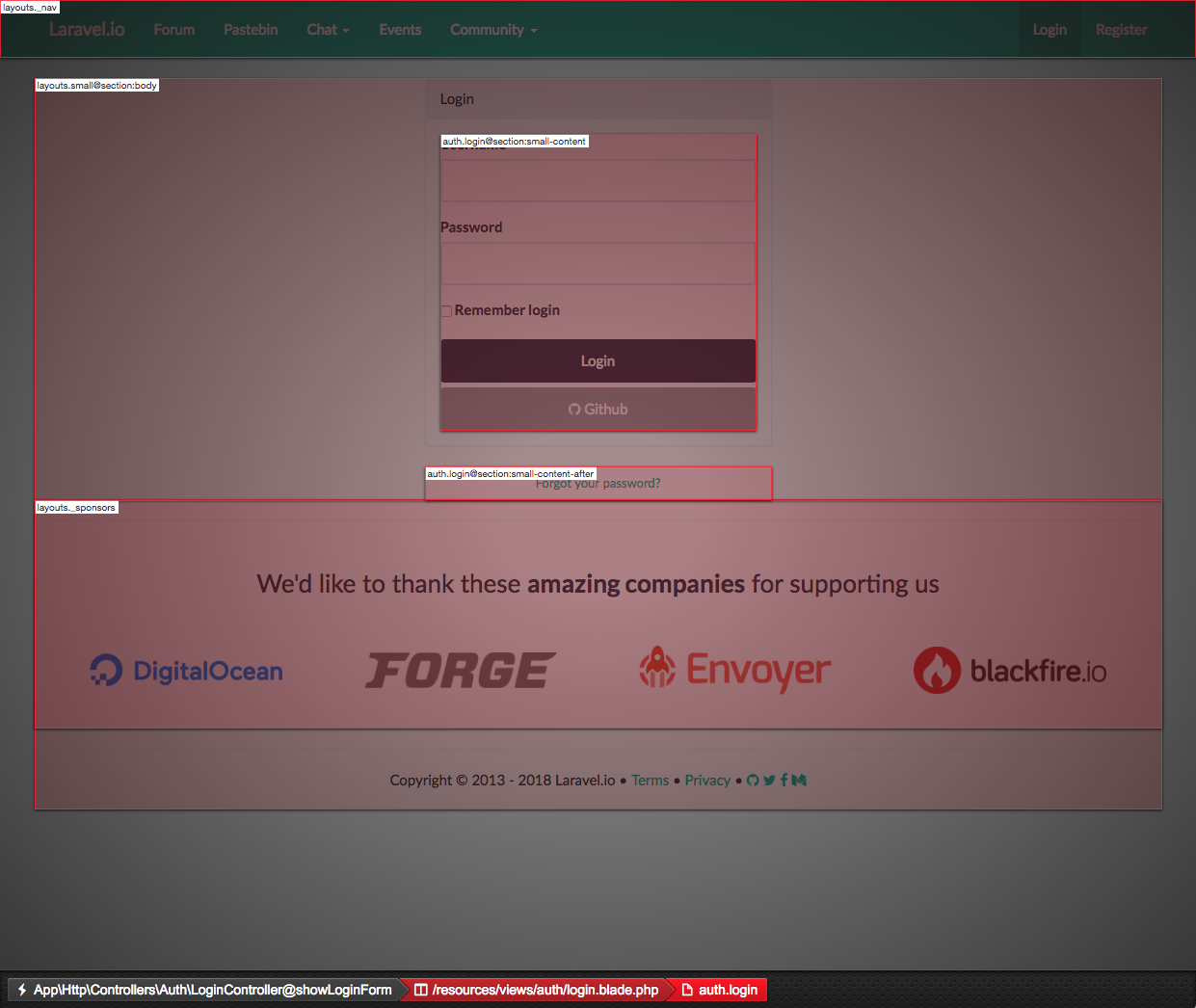
When your Laravel project grows, so do the Laravel views. Sometimes it might be hard to figure out, which part of the output HTML was rendered using which template. With this package, you can take a peek into your Laravel views and find out which template is responsible for which part of the output HTML.
Installation
You can install the package via composer:
composer require beyondcode/laravel-view-xray --dev
The package is enabled by default - so all you need to do is visit your application in the browser and hit the Xray shortcut.
- Windows: CTRL + Shift + X
- OSX: CMD + Shift + X
This toggles the Xray view, where you can see which view (and optionally section) rendered the visual output.
Disabling Xray
You can disable Xray by setting an environment variable called XRAY_ENABLED to false.
Excluding views
If you want to exclude certain views from being processed by Xray, you can do this by adding them to the configuration file.
Publish the configuration file using:
php artisan vendor:publish --provider=BeyondCode\\ViewXray\\ViewXrayServiceProvider
This will publish a file called xray.php in your config folder.
This is the content of the configuration file:
<?php

return [

    /*
     * Determines if the Xray package should be enabled.
     */
    'enabled' => env('XRAY_ENABLED', true),

    /*
     * If you want to exclude certain views from being processed by Xray,
     * you can list them here. Be aware that the check only applies to the
     * root views that you add here. If these views include other views
     * themselves, they need to be excluded manually.
     */
    'excluded' => [
        //
    ],

];
Just place the view names that you want to exclude in the excluded array.
FAQ
- Does this work with VueJS too?
Yes, this package does work in combination with VueJS, but you need to enable comments in your VueJS app. This package works by adding specific HTML comments into the rendered views and uses these comments to find the bounding boxes of the rendered HTML. VueJS by default removes HTML comments prior to rendering.
You can enable HTML comments in your VueJS app by setting comments to true:
let app = new Vue({
    el: '#content',
    comments: true
});
Testing
composer test
Changelog
Please see CHANGELOG for more information what has changed recently.
Contributing
Please see CONTRIBUTING for details.
Security
If you discover any security related issues, please email marcel@beyondco.de instead of using the issue tracker.
Credits
This project is inspired by xray-rails.
License
The MIT License (MIT). Please see License File for more information.


